Meet Dragon Copilot
A smarter, more natural way to document care, reduce after-hours charting, and stay focused on patients instead of paperwork.
Microsoft Dragon® Copilot brings together trusted voice dictation, ambient documentation, and healthcare-tuned AI in one seamless experience. Whether you already use Dragon Medical One or you’re exploring a better workflow, Dragon Copilot helps you move faster with less friction.

Why clinicians are paying attention
Dragon Copilot helps reduce documentation burden across the day, so clinicians can spend less time managing notes and more time delivering care.
Document naturally.
Speak naturally during or after the visit and let Dragon Copilot help turn conversations and dictation into complete, specialty-specific notes.
Move faster.
Spend less time typing, clicking, and cleaning up notes so you can keep your day moving without feeling buried in admin work.
Reduce cognitive load.
Let AI handle more of the repetitive documentation work, helping you stay focused on the patient in front of you.
Work-life balance.
Cut down on after-hours charting and reclaim time that usually gets lost to unfinished documentation.
Move forward without starting over
Dragon Copilot builds on the trusted dictation experience clinicians already know from Dragon Medical One while adding ambient documentation and healthcare-focused AI in one unified workflow.
- Continue using familiar voice dictation and speech recognition
- Preserve key commands, vocabularies, profiles, templates, and AutoTexts during migration
- Add ambient capture and AI-assisted documentation without abandoning the workflows that already work
Keep what works
Carry familiar Dragon Medical One tools and preferences into a more complete clinical documentation experience.
Add ambient documentation
Capture patient conversations and create draft notes while staying focused on the encounter instead of the keyboard.
One experience. Less friction.
Bring trusted dictation, ambient documentation, and AI-assisted workflow support together in Dragon Copilot.
What Dragon Copilot helps you do
Built to support clinicians with practical, everyday tasks that add up to real-time savings.
Generate detailed notes
Capture multiparty, multilingual patient conversations and convert them into structured documentation with less manual effort.
Refine notes your way
Customize note style, apply templates, and use prompts or voice commands to make edits faster and more consistently.
Work across your workflow
Dictate naturally and stay productive across supported applications without slowing down to rework the same information.
Use AI built for healthcare
Get a workflow designed for clinical use, with healthcare-focused safeguards and a more purpose-built documentation experience.
A purpose-built microphone for Dragon Copilot
Philips SpeechMike Ambient gives clinicians a dedicated wearable microphone for ambient patient conversations, professional dictation, and voice-driven clinical workflows.
Philips lists Microsoft Dragon Copilot and Dragon Medical One among its supported speech recognition solutions. A four-microphone array, selectable ambient and dictation modes, and secure wireless connectivity help provide a consistent audio input while clinicians move naturally through the day.
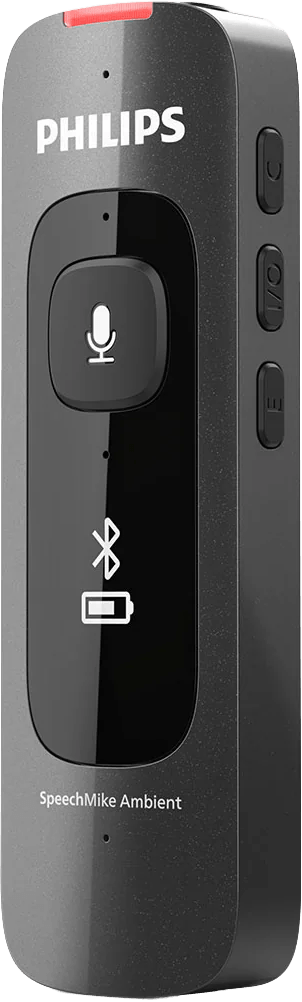
Clearer clinical capture
Four beamforming microphones help capture speech clearly during patient conversations and focused dictation.
Ambient or dictation
Select Ambient Mode for conversations or Dictation Mode for focused, single-speaker voice capture.
Built for Dragon workflows
Supports voice workflows using Microsoft Dragon Copilot and Dragon Medical One.
Wearable and secure
Encrypted Bluetooth LE, secure pairing, wearable accessories, and up to 10 hours of continuous use support clinical mobility.
See how Dragon Copilot can fit into your workflow
Whether you’re moving from Dragon Medical One or exploring a new approach to documentation, Dragon Copilot offers a more unified way to reduce burden and support better clinical focus.
See What Dragon Copilot Can Do
Make Documentation Work Better for You
Customizable Documentation:
Shape documentation around the way you prefer to work.
Referral Letters:
Capture more insights from patient conversations while minimizing manual work.
After-Visit Summaries:
Give patients a clear recap while keeping the clinician’s workload manageable.
Summarize Evidence:
Quickly bring trusted clinical information into the conversation when you need it.
Summarize Encounters:
Quickly review key patient details before completing documentation, reducing cognitive load and ensuring accuracy in every note.
Coaching:
Get help making clinical notes clearer and more complete while staying in control of the final result.
Multilingual Encounter Capture:
Hold patient encounters in Spanish while automatically generating documentation in English.
Orders:
Automatically capture and process over 12 different order types from clinician-patient conversations.
Inpatient Care:
Expand AI-powered documentation and workflow automation across various care settings.
Microsoft Fabric integration:
Use point-of-care data to uncover patterns and support better-informed decisions.
Anywhere access:
Work across supported mobile, web, desktop, and embedded EHR experiences.
Looking for a practical Dragon Copilot review?
See the core features, questions worth asking, workflow considerations, and what to evaluate before deciding whether Dragon Copilot fits your team.
Read the Dragon Copilot ReviewWant to learn more?
Questions about how your information is handled? Read our Privacy Policy.
The form could not load. Please refresh the page or contact us again in a moment.